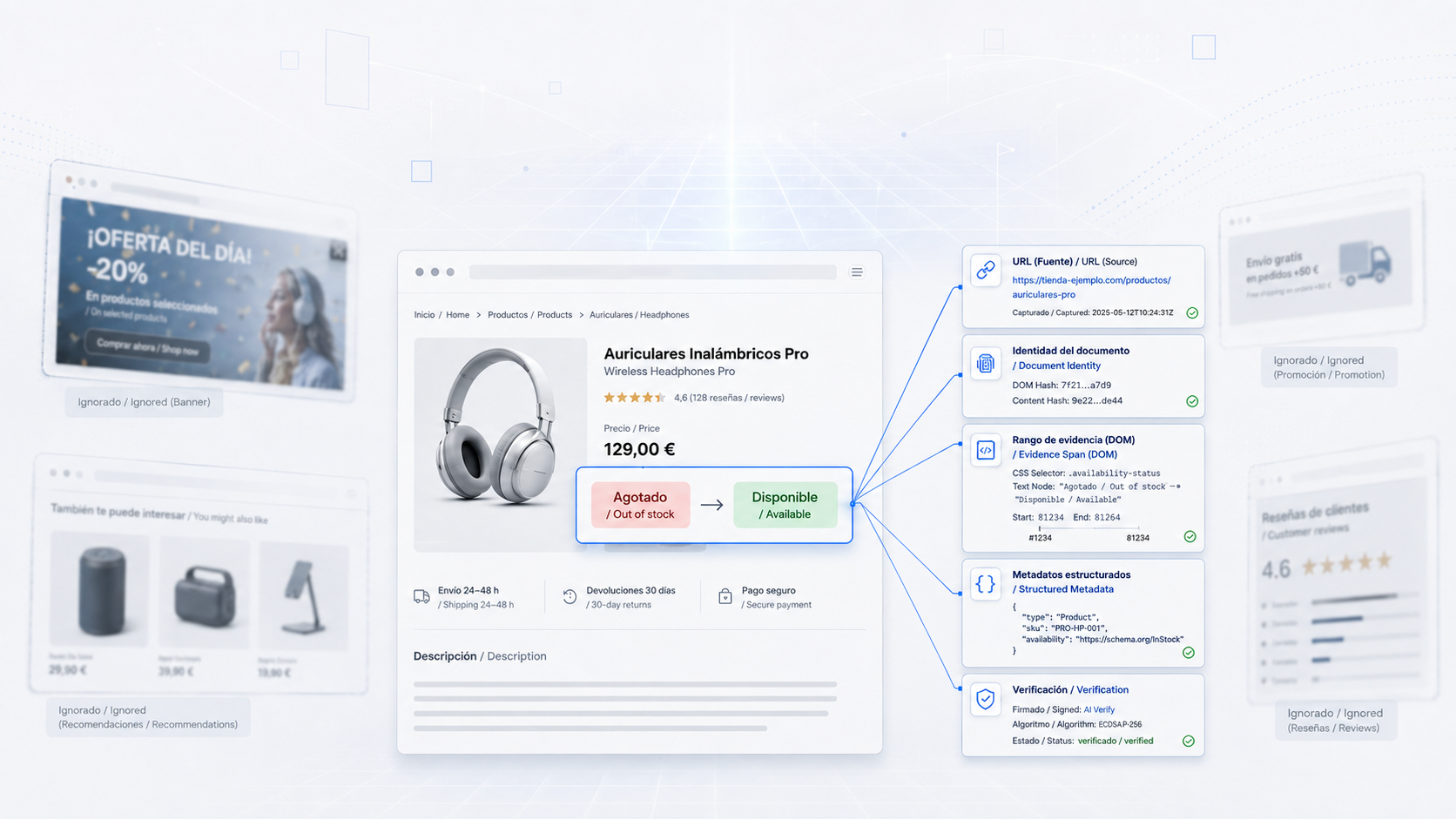
Over the past few weeks, we have turned Thorondor into something considerably more useful for an agent.
Previously, Thorondor received a question, searched pages, processed them, and returned relevant passages with their sources. That remains the core of the system, but the agent can now work with the web much more precisely.
Thorondor can query a specific URL, follow its redirects, identify exactly which document it received, and return links, tables, structured metadata, and verifiable excerpts from the original source.
It can also detect whether a page is new, unchanged, changed, or gone. But the important part is that it does not merely compare entire pages. The agent can identify a specific target: a button, a price, a status, or text inside a section.
For example:
"Watch this product page and let me know when it changes from 'Out of stock' to 'Available.'"
Ads, counters, and other irrelevant changes can modify the page as a whole, but they will not trigger that alert if the specific target has not changed. Thorondor distinguishes between "the page is different" and "the exact transition I care about has occurred."
For more complex pages, we added structured profiles for links, tables, and JSON-LD, along with schema-limited extraction using JSON schemas. Each extracted datum retains the identity of the document it came from and a verifiable reference to its content. If the model returns a datum that cannot be demonstrated in the original text, Thorondor discards it.
This is especially important because a web page is not a trustworthy source by default. It may contain malicious instructions, incomplete data, or content designed to confuse an agent. Everything that comes from the web is treated as external, untrusted information. Structured extraction validates results before presenting them as evidence.
We also added sitemaps, robots.txt reading, domain- and path-bounded crawling, time limits, memory limits, and cooperative cancellation. For longer operations, there is now a durable job mode with pagination, restart recovery, cancellation, and idempotency.
The architecture preserves an important decision: normal search remains live and non-persistent. Page caching is activated only explicitly for known URLs. Likewise, Thorondor does not schedule tasks or send notifications on its own. Its role is to provide precise observations. Tengwar, or the agent using it, decides when to query, which transition to wait for, and what action to take next.
The result is a Thorondor that is more useful for autonomous agents: fewer answers based on entire pages, more addressable evidence, more control over relevant changes, and fewer chances for a noisy or malicious web source to accidentally become a decision.
Thorondor no longer just searches pages. It now lets agents discover, inspect, compare, and monitor specific information on the web with verifiable evidence.
Over the latest development phases, we have turned Thorondor into a web intelligence layer designed specifically for agents.
An agent can search for up-to-date information, query a specific URL, discover a site's pages, crawl a limited section of a website, or request structured data such as links, tables, and metadata.
The fundamental difference is that Thorondor does not return only generated text. It returns information together with its provenance: the final URL, the document, the exact passage, its position within the document, and its trust status.
An overview
flowchart LR
  A[Agent] --> M[Thorondor MCP]
  M --> S[web_search]
  M --> F[web_fetch]
  M --> MP[web_map]
  M --> C[web_crawl]
  S --> SX[SearXNG]
  SX --> W[Public web]
  S --> CR[Crawl4AI]
  CR --> E[Clean and cited content]
  F --> CR
  MP --> R[Robots and sitemaps]
  MP --> L[Links and scope policies]
  C --> R
  C --> CR
  E --> V[Document identity and evidence]
  F --> V
  C --> V
The four tools are:
1. web_search: search for current information
This is the tool an agent would use when it does not yet know exactly which URL contains the answer.
Request:
{
  "query": "Python official documentation",
  "search_profile": "quick",
  "decompose": false,
  "max_urls": 2,
  "max_passages": 2,
  "token_budget": 500,
  "include_raw_markdown": false
}
Response:
{
  "query": "Python official documentation",
  "passages": [
    {
      "citation_id": 1,
      "document_id": "fb3e28edef8719c102...",
      "evidence_id": "4027d2eff4788ad28...",
      "start_index": 0,
      "end_index": 4620,
      "section_heading": null,
      "text": "Python is a programming language that lets you work more quickly...",
      "score": 0.89,
      "provenance": "external_web",
      "trust": "untrusted",
      "verbatim": true
    }
  ],
  "citations": [
    {
      "id": 1,
      "url": "https://www.python.org/",
      "title": "Welcome to Python.org",
      "document_id": "fb3e28edef8719c102...",
      "evidence_spans": [
        {
          "start_index": 0,
          "end_index": 4620,
          "evidence_id": "4027d2eff4788ad28...",
          "verbatim": true
        }
      ]
    }
  ],
  "stats": {
    "discovery_status": "degraded",
    "urls_discovered": 10,
    "urls_selected": 2,
    "urls_crawled_ok": 1,
    "reranked": false,
    "tokens_returned": 500
  },
  "schema_version": "thorondor.search.v1"
}
The important point is not simply that https://www.python.org/ appears. Thorondor also indicates:
Which document produced the data.
Which exact passage was used.
Where that passage begins and ends.
Whether the passage is genuinely a literal portion of the document.
Whether the search completed fully or ran in degraded mode.
This lets the agent answer with a concrete source and verify the original passage.
2. web_fetch: query a known URL
When the agent already knows the page, it does not need to perform a search. It can request it directly:
Request:
{
  "urls": ["https://example.com"],
  "structured_formats": ["links"]
}
Response:
{
  "schema_version": "thorondor.fetch.v1",
  "stats": {
    "requested": 1,
    "succeeded": 1,
    "failed": 0,
    "cache_bypassed": 1
  },
  "results": [
    {
      "requested_url": "https://example.com",
      "final_url": "https://example.com/",
      "outcome": "content",
      "status_code": 200,
      "content_type": "text/html",
      "title": "Example Domain",
      "markdown": "This domain is for use in documentation examples...",
      "cache": {
        "state": "bypass",
        "reason": "structured_source_required"
      },
      "links": {
        "internal": [],
        "external": [
          {
            "href": "https://iana.org/domains/example",
            "text": "Learn more",
            "base_domain": "iana.org"
          }
        ]
      },
      "structured": [
        {
          "format": "links",
          "status": "ok",
          "links": [
            {
              "url": "https://iana.org/domains/example",
              "text": "Learn more",
              "trust": "untrusted",
              "source": {
                "document_id": "1bf80e41d06818d706...",
                "start_index": 477,
                "end_index": 534,
                "final_url": "https://example.com/"
              }
            }
          ]
        }
      ]
    }
  ]
}
There are two levels of information here:
The normal page result: Markdown, title, final URL, HTTP status, and links.
The structured profile: a list of links with the exact position where each link was found.
This is useful when the agent does not want to interpret the entire page, but instead answer questions such as:
What links appear on this page?
Which documentation pages does this article link to?
What is the download link?
What price, button, or status appears on a specific page?
3. web_map: discover a site's structure
This tool is not primarily intended to return content. It is used to discover which URLs exist and why they were included or discarded.
Request:
{
  "url": "https://example.com",
  "sitemap": "skip",
  "include_search": false,
  "max_depth": 1,
  "max_pages": 3,
  "max_discovered_urls": 10
}
Response:
{
  "schema_version": "thorondor.map.v1",
  "requested_url": "https://example.com",
  "effective_url": "https://example.com/",
  "requested_origin": "https://example.com",
  "effective_origin": "https://example.com",
  "outcome": "completed",
  "urls": [
    {
      "url": "https://example.com/",
      "depth": 0,
      "sources": ["seed"],
      "states": ["discovered", "admitted", "queued", "fetched"],
      "reason": null,
      "trust": "untrusted"
    },
    {
      "url": "https://iana.org/domains/example",
      "depth": 1,
      "sources": ["link"],
      "states": ["discovered", "filtered"],
      "reason": "outside_origin",
      "trust": "untrusted"
    }
  ],
  "stats": {
    "discovered": 2,
    "admitted": 1,
    "fetched": 1,
    "filtered": 1,
    "pages_succeeded": 1,
    "pages_failed": 0
  },
  "warnings": []
}
The response shows that the iana.org URL appears on the map, but is discarded because it is outside example.com's origin. This prevents an agent from accidentally crawling the entire web by following external links. By default, Thorondor keeps crawling within the permitted origin and path hierarchy.
flowchart TD
  S[Starting URL] --> R[Resolve redirects]
  R --> O[Determine effective origin]
  O --> SM[Consult sitemaps]
  O --> B[Bounded BFS]
  SM --> P[Apply robots and policies]
  B --> P
  P --> D{URL admitted?}
  D -->|Yes| Q[Queue]
  D -->|No| X[Record reason]
  Q --> U[Fetched state]
4. web_crawl: discover and download pages
This tool combines the map with downloads of the admitted pages.
Request:
{
  "url": "https://example.com",
  "sitemap": "skip",
  "include_search": false,
  "max_depth": 1,
  "max_pages": 1,
  "max_discovered_urls": 10,
  "capabilities": ["markdown", "links"],
  "structured_formats": ["links"]
}
Response:
{
  "schema_version": "thorondor.crawl.v1",
  "requested_url": "https://example.com",
  "effective_url": "https://example.com/",
  "outcome": "completed",
  "results": [
    {
      "requested_url": "https://example.com",
      "final_url": "https://example.com/",
      "outcome": "content",
      "status_code": 200,
      "content_type": "text/html",
      "capabilities": ["links", "markdown"],
      "markdown": "# Example Domain\nThis domain is for use in documentation examples...",
      "cache": {
        "state": "bypass",
        "reason": "disabled"
      },
      "structured": [
        {
          "format": "links",
          "status": "ok",
          "links": [
            {
              "url": "https://iana.org/domains/example",
              "text": "Learn more",
              "trust": "untrusted"
            }
          ]
        }
      ]
    }
  ],
  "stats": {
    "discovered": 2,
    "admitted": 1,
    "pages_succeeded": 1,
    "pages_failed": 0,
    "filtered": 1
  },
  "urls": [
    {
      "url": "https://example.com/",
      "states": ["discovered", "admitted", "queued", "fetched"],
      "sources": ["seed"]
    }
  ],
  "warnings": []
}
The difference from web_map is that web_crawl also returns the typed content of each downloaded page.
The agent can use it to:
Read a complete documentation set, while limiting it to a path.
Retrieve every page in a section.
Process technical documentation.
Extract tables or links from multiple pages.
Continue processing through a durable job when the crawl is larger.
Page changes and monitoring specific targets
Thorondor separates two concepts:
flowchart LR
  A[Did the page change?] --> B[Document comparison]
  B --> C[new / same / changed / removed]
  D[Did the target I care about change?] --> E[Resolve a single element]
  E --> F[Compare text or attribute]
  F --> G[expected -> desired]
  G --> H[condition_met]
A page can change because an ad, counter, or new recommendation has appeared. That may produce:
{ "change": { "state": "changed" } }But that change does not necessarily satisfy a specific watch.
An agent can express something like:
{
  "urls": ["https://example.com/product"],
  "watch": {
    "target": { "role": "button", "name": "Availability" },
    "expected": { "text": "Out of stock" },
    "desired": { "text": "Available" },
    "match": "exact"
  }
}
The condition is met only when Thorondor observes a transition from the expected state to the desired state.
In the currently deployed instance, caching is disabled by default. A real watch call to example.com returned:
{
  "cache": { "state": "bypass", "reason": "disabled" },
  "watch": {
    "condition_met": false,
    "current": null,
    "previous": null,
    "resolution": "unsupported",
    "state": null
  }
}
This is deliberate: enabling monitoring requires accepting local persistence, configuring the cache, and making successive observations. Thorondor does not schedule tasks or send notifications. Tengwar, or the agent using it, decides when to repeat the call and what to do next.
An MCP response has two levels
Under the hood, MCP transports the result inside an envelope similar to this:
{
  "is_error": false,
  "content": [
    {
      "type": "text",
      "text": "{\"schema_version\":\"thorondor.fetch.v1\", ...}"
    }
  ]
}
This allows simple MCP clients to consume the result as JSON text, while more advanced clients can interpret the versioned contract and its typed fields.
Security and limits
flowchart TD
  U[External URL or content] --> S[URL validation]
  S --> R[Robots and scope]
  R --> C[Crawl4AI]
  C --> P[DNS pinning and dedicated egress]
  P --> T[Public web]
  T --> C
  C --> V[Content marked as untrusted]
  V --> A[Agent]
Thorondor enforces:
URL, page, depth, and byte limits.
Deadlines and cancellation.
Protection against internal destinations and SSRF.
Separate networks for internal control and web egress.
Robots.txt and scope policies.
Stable document identity.
Exact evidence with offsets.
Local validation of structured responses.
Complete rejection of schema results that cannot be proved in the source.
Web content never automatically becomes trusted instructions for the agent.
What changes for the agent
The main improvement is not that Thorondor "knows more things." It is that it can now answer more precise questions:
Before:
"Search for information about this product."
Now:
"Check this page, verify whether the product is available, verify the button text, and alert me only when it changes from 'Out of stock' to 'Available.'"
Before:
"Crawl this site."
Now:
"Discover the URLs under this section, respect robots.txt, stay within the domain, limit the crawl to ten pages, and return the results with their status and provenance."
Before:
"Extract the data from the page."
Now:
"Return the links and tables, indicating which document and exact position each value came from."
That is the goal of this evolution: to make Thorondor a reliable tool for agents to observe the web, verify facts, and react to specific changes, while keeping the origin of the information visible at all times.